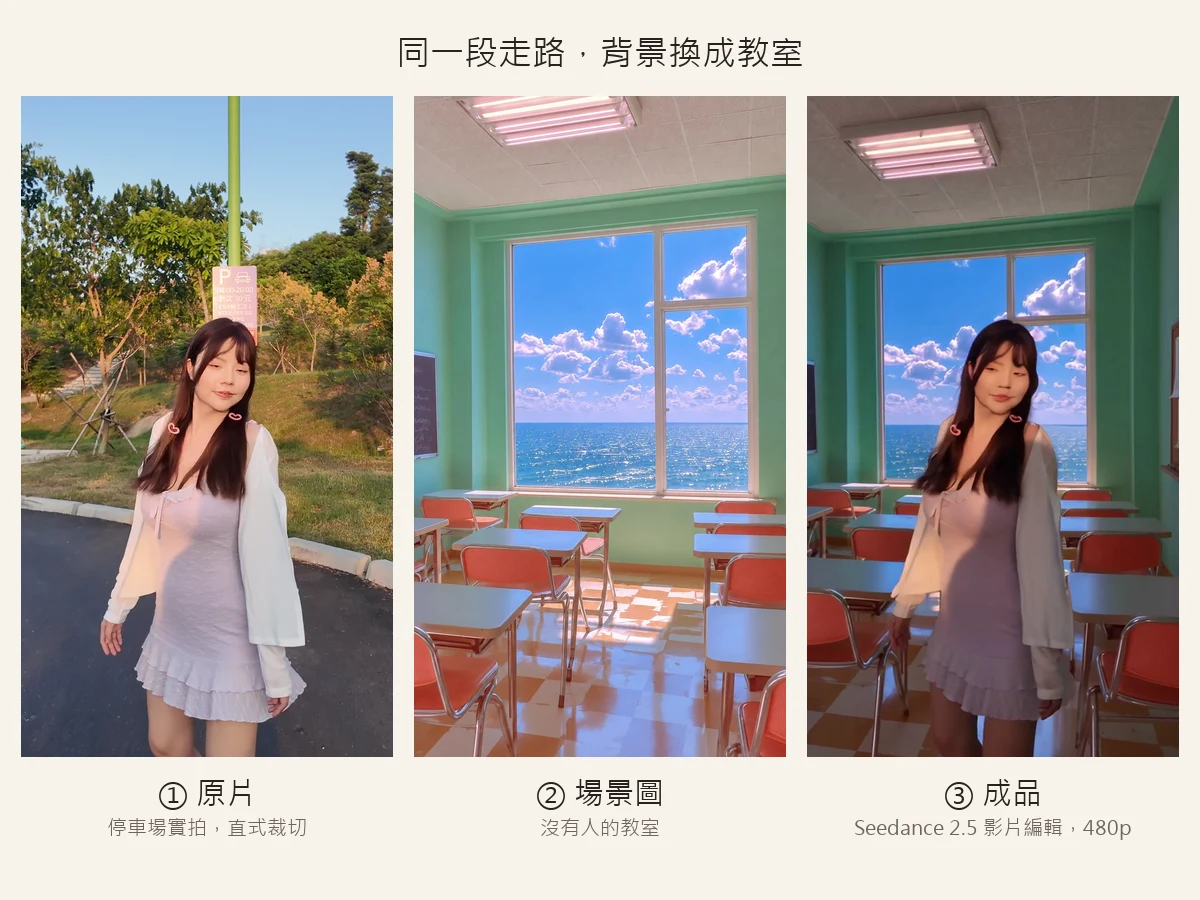
用 Higgsfield 的 Seedance 2.5 影片編輯換背景,提示詞照四段寫:兩份素材各管什麼、人物哪些不能動、環境換成什麼、光線怎麼打。送出前先把原片裁成成品要的比例。
這篇只講提示詞、光線與比例。拍攝、空場景底圖、先 480p 再高畫質這些基本流程,寫在真人影片怎麼融進 AI 場景的五步驟。文中數字是我們帳號的製作紀錄,不是通用設定;模式、畫質與扣點請以送出前的帳號畫面為準。
1. 在 Higgsfield 上的操作順序
- 進 Higgsfield,影片模型選 Seedance 2.5,模式選 video edit(影片編輯)。
- 影片欄放自己拍的原片。
- 圖片欄放一張沒有人的場景圖。
- 貼上提示詞(寫法在第 3 節)。
- 畫質先選 480p 送出,看構圖、人物與光線。
- 沒問題再用同一組素材與提示詞出高畫質。
要選的是影片編輯,不是圖生影片,也不是整支重繪。影片編輯會讀原片,保留人物,只處理背景和光線。
2. 送出前先確認兩件事
原片先裁成成品的比例。 直式成品就先把原片裁成 9:16 再上傳,不靠生成時再改比例。這一點我們付過學費:電話亭案例一開始用橫式原片出了一支橫式成品,後來要直式,只能重做一次,多花一次點數。
4K 橫式原片(3840×2160)裁成直式,可以在自己電腦用 ffmpeg 處理,不花點數:
ffmpeg -i input.mp4 -vf "crop=1215:2160:(iw-1215)/2:0,scale=1080:1920" -c:v libx264 -crf 19 -an output.mp4
(iw-1215)/2 是從正中間裁。人不在畫面正中間時,把這個數字改成實際的左邊界。裁完每秒抽一格看,確認人從頭到尾都在框裡,再上傳。
場景圖的鏡頭方向要跟原片對得上。
| 原片怎麼拍 | 場景圖要是什麼視角 | 我們的例子 |
|---|---|---|
| 鏡頭跟在人背後,人往前走 | 往前看的視角,前方有路可走 | 教室:正對窗戶,中間留一條走道 |
| 鏡頭在人前面倒退,人朝鏡頭走 | 回頭看的視角,路在人身後延伸 | 電話亭:公路往遠處延伸,電話亭在路邊 |
3. 提示詞的四段結構
| 段落 | 要寫什麼 | 教室案例的寫法 |
|---|---|---|
| 素材分工 | 影片管人物與動作,圖片只管環境 | 影片中的女生維持原樣;環境換成參考圖的教室 |
| 保留 | 臉、頭髮、衣服、動作、鏡頭距離,逐項列出 | 長黑髮、白色針織外套、淡紫色荷葉邊短裙、走路與最後回頭 |
| 環境 | 場景裡有什麼、人在場景的哪裡 | 薄荷綠牆、橘椅白桌、格紋地板、前方大窗;她走在中間走道 |
| 光線 | 光從哪裡來、影子落在哪 | 窗戶的柔和日光在她前方,影子落在格紋地板 |
「保留」那段寫得越具體越好核對。衣服寫顏色和款式,動作寫出順序,成品出來才知道要對照哪幾項。
4. 完整提示詞|教室案例(光線接近,一句帶過)
原片是在停車場拍的 12 秒走路,鏡頭跟在背後,最後回頭。原片和場景都是白天,光線用最後一句交代就夠。原片、場景圖和成品的對照,就是本篇最上面那張圖。
Keep the woman exactly as she appears in the video: same face, same long dark hair, same white cardigan and pale lilac ruffled skirt, same walking motion and her turn toward the camera at the end. Replace the entire environment with the pastel classroom from the reference image: mint green walls, orange chairs and white desks on both sides, checkered floor, a large window ahead with blue sea and clouds. She walks down the center aisle between the desks toward the window; the camera follows behind her at the same distance as in the original video. Soft daylight from the window in front of her, cool fill from the room, her hair and skirt keep their original movement, her shadow falls on the checkered floor.
這次的結果: 480p、12 秒,扣 43 credits,輸出 480×854、24fps。我們抽格核對,臉、白外套、紫裙、走路和回頭都與原片一致,教室、格紋地板與海景窗都有出現,光線方向來自窗戶。
換成自己的影片時,把衣服、動作、場景物件改成實際內容,結構不用動。
5. 原片光線和場景不合:把光線獨立寫成一段
原片是下午的金色直射陽光,場景卻是黃昏藍調,這時候光線不能只寫一句。在同一個影片編輯畫面裡,提示詞多加一段「重新打光」,把四件事講清楚:
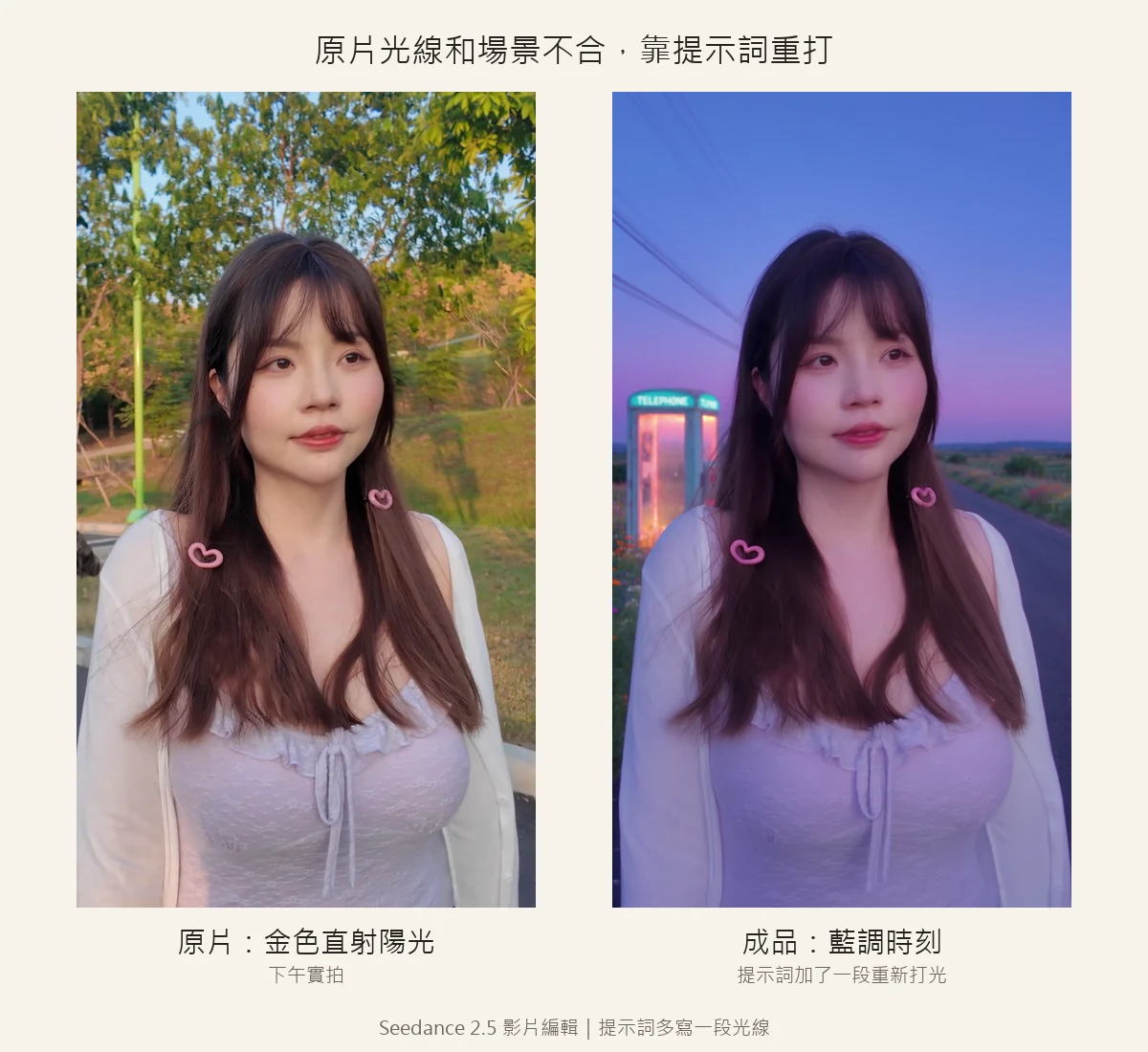
- 拿掉什麼: 原片打在臉和衣服上的金色直射陽光、硬陰影。
- 主光是什麼: 場景天空的柔和冷色漫射光,均勻落在臉、頭髮和衣服上。
- 邊光從哪來: 場景裡會發光的東西。電話亭的暖光照亮周圍的花,也在她靠電話亭那一側的髮絲留一道暖色邊光。
- 曝光和色溫: 人跟場景一致,寫出大約的色溫。
6. 完整提示詞|電話亭案例(重新打光)
原片是 9 秒的正面走路,鏡頭在人前面倒退,下午金色陽光。場景圖是黃昏公路邊一座發光的電話亭。
Keep the woman exactly as she appears in the video: same face and features, same long brown hair with bangs, the pink heart hair clips on both sides, the white knit cardigan and pale lilac dress. Her walk toward the camera, her glances to the sides and her final look into the lens stay exactly as in the original video, at the same medium close-up framing.

Replace the entire environment with the scene from the reference image, recomposed for a vertical 9:16 frame. She walks along the straight asphalt country road, which stretches behind her to the horizon. On the left of the frame, behind her shoulder, the glowing phone booth stands in the roadside flower field, fully inside the frame; the cyan sign on top reads "TELEPHONE" and warm orange-pink light glows from inside. Wildflowers in pink, violet, orange and blue line the road, wooden power poles and wires run into the distance, and the top third of the frame is a dusk sky fading from deep blue-violet to pink-violet. The parking lot, cars, street lamps and trees from the original video are all gone.

Camera: handheld, about 1.5 meters in front of her, moving backward as she walks, with a visible handheld bounce of about 2 cm on each step and a slight side-to-side sway. As the camera retreats, the phone booth and power poles slowly recede behind her with natural parallax.

Lighting (priority): remove the golden direct sunlight and hard shadows that fall on her face and clothes in the original video, and relight her for blue hour. Key light is the soft cool skylight from the deep blue-violet sky above, falling evenly on her face, hair and cardigan; her skin stays natural with a slightly cool tone. The pink-violet afterglow on the horizon draws a faint rim along her hair and shoulders. The warm orange-pink glow of the phone booth behind her is a point source: it lights the flowers around the booth and leaves a soft warm edge on the side of her hair and cardigan facing the booth, fading with distance. Her exposure and color temperature match the scene, around 7000K, as if she is really standing in this dusk.

A light breeze moves her hair, the hem of her cardigan and the roadside flowers. Photoreal, shallow depth of field, fine film grain. No background music, no subtitles.
成品要核對的地方: 原片的金色陽光有沒有消失、人物是不是跟場景同一個冷色調、靠電話亭那一側有沒有帶一點暖色、招牌字樣是否正確、鏡頭後退時電話亭有沒有跟著變遠。我們這支成品這幾項都有做到。
提示詞用中文寫也可以,Seedance 2.5 讀得懂。選自己好核對的語言。
7. 鏡頭和「不要的東西」怎麼寫
- 鏡頭: 寫鏡頭在哪、怎麼動。「鏡頭在她正前方倒退,隨腳步上下起伏,有手持感」比「要有動感」好核對。
- 原場景的東西: 直接點名,讓它們消失。例如「原影片裡的停車場、汽車、路燈、樹木全部消失」。
- 場景裡的字: 招牌上的字要寫出來,例如亭頂燈牌寫「TELEPHONE」。
- 場景物件的位置: 直式畫面比較窄,重要物件要寫明在畫面哪一側、要完整入鏡。
- 聲音與字幕: 不需要就寫「不要背景音樂、不要字幕」。
8. 費用與時間
以下是我們帳號(Higgsfield Plus 方案)的紀錄,Seedance 2.5 影片編輯依影片長度計費:
| 項目 | 設定 | 點數 | 紀錄日期 |
|---|---|---|---|
| 測試版 | 480p、12 秒 | 43 credits | 2026-11-01 |
| 中畫質(報價) | 720p、12 秒 | 91 credits | 2026-11-01 |
| 高畫質 | 1080p、11 秒 | 222 credits | 2026-10-24 |
| 裁切直式、抽格檢查 | 本機 ffmpeg | 不花點數 |
480p 從送出到完成大約幾分鐘。點數規則會調整,請以平台當下顯示為準;整體預算怎麼抓,可以看AI 影片工具費怎麼估。
9. 成品不對時,先查哪一項?
一次只改一項,才知道問題出在哪。
| 現象 | 先查 | 處理方向 |
|---|---|---|
| 人被裁掉或構圖跑掉 | 原片比例是否等於成品比例 | 先裁好再上傳 |
| 人帶著原片的光,像貼上去 | 提示詞有沒有獨立的光線段 | 補上拿掉什麼光、主光、邊光、色溫 |
| 場景裡的重要物件沒入鏡 | 環境段有沒有寫位置 | 寫明物件在畫面哪一側、完整入鏡 |
| 招牌文字變形 | 有沒有把字寫出來 | 在提示詞裡寫出確切文字 |
| 衣服或動作被改 | 保留段是否逐項列出 | 補上顏色、款式與動作順序 |
| 背景移動方向怪 | 場景圖視角是否符合原片鏡頭方向 | 換一張視角相符的場景圖 |
自己試試看
先拿一段 6 到 10 秒的原片,裁成要發的比例,照四段結構寫一版提示詞,在 Higgsfield 出 480p 看結果。前往 Higgsfield ↗(超直白推薦連結;模型、畫質與點數以平台畫面顯示為準。)
同一段動作要連續換好幾個場景,做法在同一動作穿越六個世界。